PostMore
LiveDictate your thoughts, get AI-generated tweets, post when you're ready
View on App Store →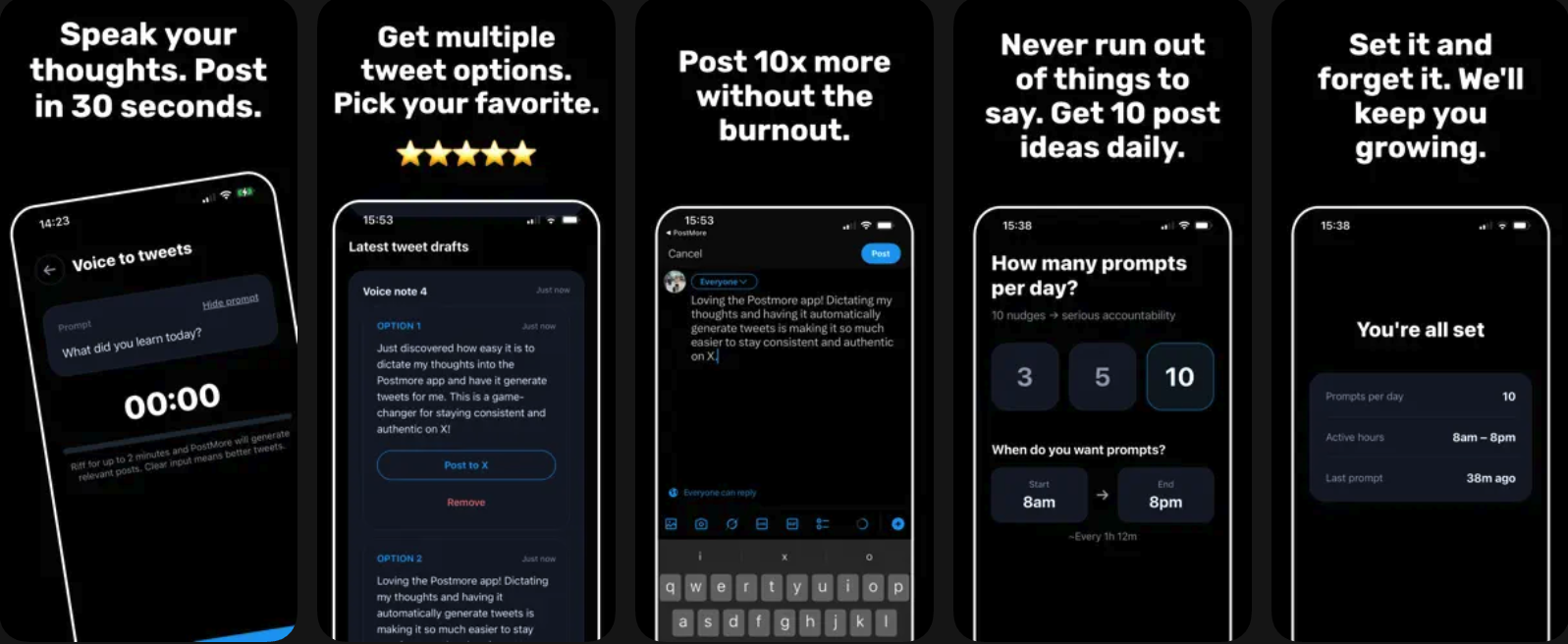
TLDR
Built with React Native, Gemini API for tweet generation, and X API for posting. Shipped iteratively: prompts first, then AI generation, then scheduling. Minimal traction. The key insight: vitamins don't sell themselves—behavior change is a high bar without acute pain.
The Problem
Building an online presence on X (Twitter) has tremendous value—sharing thoughts, connecting with people, growing an audience. But the advice is always the same: post consistently. Multiple times a day, every day. That's how you reach people and build momentum.
The challenge? Consistently creating quality content is hard. You sit down to tweet and draw a blank. Or you have a thought while driving but lose it before you can write it down. Or you draft something but second-guess whether it's good enough to post.
Tools like Buffer and Typefully solve the scheduling problem, but they don't help with the creation problem. You still need to come up with the content yourself.
The Bet
What if an app could solve both problems at once? Prompt you with ideas to get the creative juices flowing, let you respond by voice (capturing thoughts in the moment), then use AI to transform that raw dictation into polished tweet options.
The hypothesis: lower the friction of content creation enough, and people will actually post consistently. Voice is faster than typing. AI handles the editing. Scheduling handles the timing.
I validated the idea by building in public on Twitter, asking if people would use a dictation-to-tweet tool. The response was positive enough to build it.
Building It
The app evolved through three distinct versions, each adding a layer of functionality.
V1: Prompts + Manual Writing
The first version was minimal: push notifications with creative prompts to spark ideas, and a simple interface to write tweets. No AI, no dictation. Just reminders to post and a place to do it.
V2: Voice Dictation + AI Generation
This was the real unlock. Tap a notification, speak your response, and the app generates multiple tweet options using AI. Pick your favorite, edit if needed, post.
V3: Scheduling
The final piece: instead of posting immediately, queue tweets for optimal times. Set it and forget it.
Iterative Shipping
Each version was a complete product that delivered value. I didn't wait until everything was built to ship. V1 validated that prompts helped. V2 validated that AI generation was useful. V3 completed the workflow.
Technical Decisions
Push Notifications + Cron Jobs
Getting notification permissions from Apple, then building a backend cron job to send prompts at the right frequency. Users can configure how many prompts per day they want—the backend handles the scheduling.
Prompt Library
I worked with AI to generate ~100 prompts across categories: Build in Public, Small Wins, Reflection, Human Moments, Get Help, and more. Each prompt is designed to be voice-friendly—questions you can answer out loud without needing to think too hard.
Examples:
- "What tiny thing just worked for you?"
- "What rabbit hole did you just go down?"
- "What would yesterday-you not believe about today?"
- "What are you stuck on right now?"
LLM Integration (Gemini 2.5 Flash)
I chose Gemini for speed and cost. Flash is fast enough that users don't feel like they're waiting, and cheap enough that I'm not worried about API costs at scale.
The prompt engineering focuses on generating tweets that sound human, not AI-generated. The system prompt includes guidelines for tone, length, and style—avoiding corporate speak, keeping things conversational, matching the user's voice from their dictation.
Quality Control
A few safeguards to keep output quality high:
- Multiple options: Generate 3-4 tweet variations so users can pick what resonates
- Length constraints: Keep tweets punchy—the prompt enforces character limits and discourages rambling
- Tone matching: The AI analyzes the user's dictation style and tries to match it
- Edit before post: Users always review and can edit before anything goes live
X API Integration
OAuth flow lets users connect their X account. The API approval process was straightforward. Once connected, tweets can be posted immediately or scheduled for later—the backend handles the actual posting via cron job.
Tech Stack
React Native (cross-platform potential), Supabase for the backend and database, Gemini API for generation, X API for posting.
What I Learned
Vitamins vs. Painkillers (Again)
Traction has been minimal. The honest assessment: this is a vitamin, not a painkiller. It's asking users to change their behavior—dictate instead of type—which is a high bar. People who already post consistently have their own workflow. People who don't post consistently... mostly don't want to post consistently.
The tool is genuinely useful for me. But "useful for me" doesn't always translate to "useful for a market."
Technical Growth
This project pushed me into new territory:
- Push notifications: Apple's permission system, backend cron jobs, user preference management
- LLM integration: Prompt engineering for consistent output quality, handling API responses, managing costs
- OAuth flows: Third-party authentication with X, token management, secure credential storage
True MVP Approach
V1 was a true MVP—just prompts, nothing else. If that didn't work, there was no point building the rest. Once prompts proved useful, I layered on AI generation, then scheduling. Each version was complete on its own, and each informed what came next.