TLDR
Built with React Native and Apple's Screen Time API for automatic consumption tracking. Works as a personal tool but low external adoption. The key insight: framing a problem differently doesn't mean you inherit the existing market—you're actually targeting a completely different (and smaller) set of users.
The Problem
It was summer, and I found myself in a familiar pattern—scrolling through social media, vaguely aware that time was slipping away. When you factor in working out, eating, commuting, taking care of kids, the actual hours left for meaningful work and creative pursuits shrink fast.
I started noticing apps like Brain Rot that block social media entirely. Interesting approach, but it felt like treating the symptom. I didn't want to just block consumption—I wanted to understand my relationship with it. How much time was I actually spending creating versus consuming? I had no idea.
I'm a serial tracker. Nutrients, workout minutes, sauna sessions, cold plunges. But I had no visibility into arguably the most important metric: how I was spending my creative energy.
The Bet
The hypothesis was simple: if I could see my create-to-consume ratio, I'd naturally start optimizing for creation. Awareness would drive behavior change without needing to block anything.
I briefly tried Brain Rot but didn't want to pay for something that only solved half the problem. So I decided to build my own—with a twist. Instead of punishment (blocking apps), I'd build for awareness (tracking both sides of the equation).
There was a secondary motivation: I'd never shipped an iOS app from idea to production entirely on my own. This felt like the right project to learn the full engineering scope—App Store submissions, Apple's review process, real users.
Building It
From idea to working prototype took about two weeks, building in off-hours. I chose React Native for cross-platform potential—the app compiles to Swift for iOS today, but can eventually ship on Android without a rewrite.
MVP Scope Decision
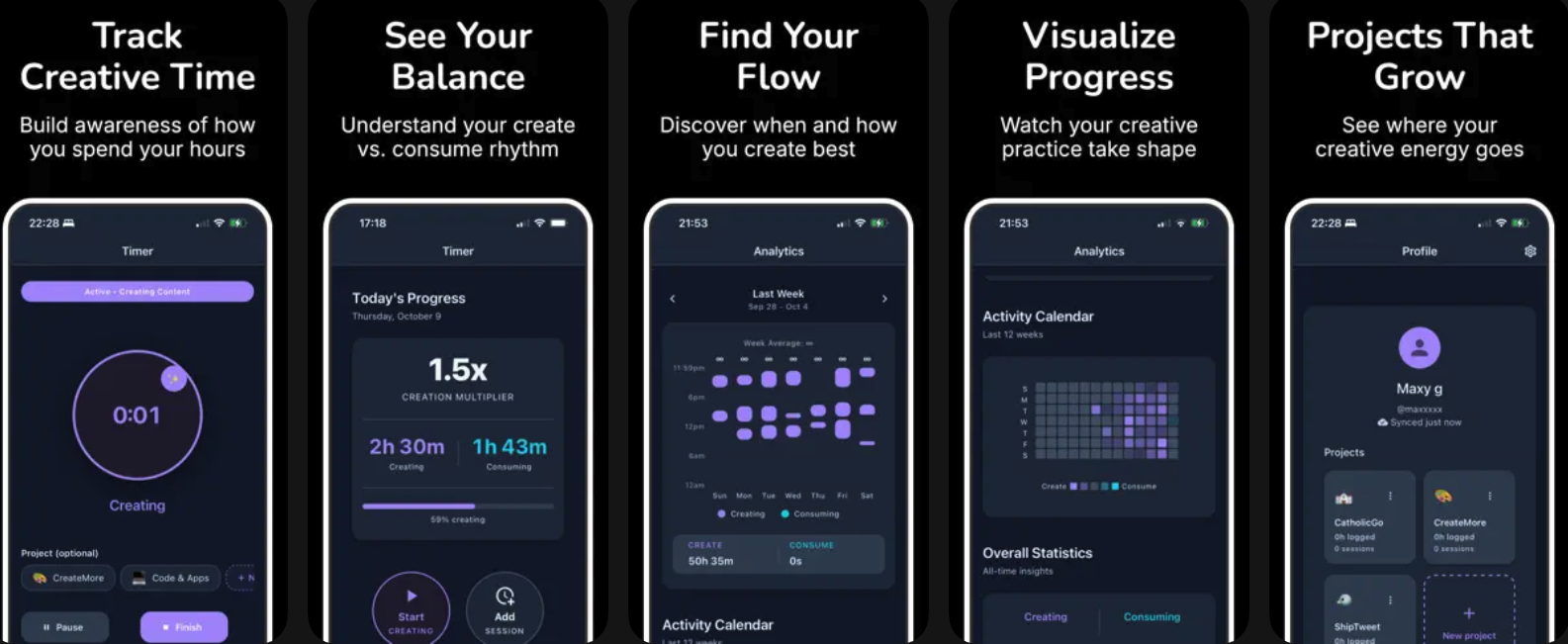
The first version was deliberately minimal: a simple timer to manually track creation sessions. No consumption tracking, no projects, no accounts. Just answer one question—how much time did I spend creating today?
The data layer started with SQLite for local storage. Everything runs offline-first. Users can open the app and start tracking immediately without creating an account, signing in, or granting permissions. Reducing friction to first value was the priority.
Technical Decisions
Local-First Architecture
I wanted the app to work offline and respect user privacy by default. All session data lives in SQLite on the device. Account creation is optional—when users do sign up, data syncs to Supabase (Postgres) so they can access it across devices.
The sync logic handles edge cases like logging in from a new device: pulling down historical sessions, reconciling unique IDs, ensuring nothing gets duplicated or lost. Not glamorous work, but essential for trust.
Screen Time API Integration
This was the technical mountain of the project. Apple's Screen Time API lets you read device usage data—exactly what I needed for automatic consumption tracking. But getting access required navigating Apple's permission system, which is notoriously opaque.
The Screen Time API is not well documented. I expected Apple's developer resources to be comprehensive, but this corner is sparse. Even the developer forums felt like people were guarding secrets. You have to dig, experiment, and figure things out yourself.
The approval process took about two weeks. Key lesson: make sure your entitlements and permissions are properly configured in your Apple Developer account before you start. Small misconfigurations can cost you cycles.
Once integrated, the app automatically tracks social media consumption without users having to do anything. The create side stays manual (you're actively choosing to track), but the consume side runs in the background.
Evolution
After using the MVP myself for a few weeks, patterns emerged that shaped what came next.
Adding Automatic Consumption Tracking
Manual logging worked for creation—there's intentionality in starting a creative session. But asking users to log every time they opened Instagram felt like friction that would kill the habit. Screen Time API integration made consumption tracking passive and complete.
Projects
I was working on multiple things simultaneously—this app, other projects, writing. Knowing I spent 2 hours creating was useful, but knowing I spent 45 minutes on CreateMore, 30 minutes writing, and 45 minutes on something else was actionable. Projects let you attribute creation time to specific work.
What I'm Not Building
No social features. No following other users. No leaderboards or sharing. Nobody has asked for it, and adding social mechanics would change what the app is about. It's a personal tool for self-awareness, not a platform.
What I Learned
The Core Insight
Using the app revealed something uncomfortable: I wasn't spending nearly as much time on creative work as I thought. The data was clarifying. It's helped me be more intentional about how I allocate the limited hours I actually have.
On Market Fit
User adoption is low—I haven't spent time on marketing because I built this primarily as a tool for myself. The honest assessment: not many people care about tracking their creative time. It's a niche within a niche.
If I were optimizing for growth, I'd tackle a problem with a larger addressable audience. But as a learning project and personal tool, it's been exactly what I needed.
Technical Growth
Shipping an iOS app end-to-end taught me things I couldn't have learned any other way: App Store review cycles, provisioning profiles, the reality of integrating with Apple's ecosystem. As a PM, having visceral understanding of what's involved in mobile development makes me significantly more effective when working with engineering teams.